Course Requirement
Ensure students can't take Courses before they're eligible
Table of Contents
Overview
For a use case, see Pre-requisites (and other requirements) for Courses.
Course Requirements are created under a Course record, and they outline the requirements a student must meet before they are eligible to enroll in it.
Let's say you have some course BUS104. In order to take it, students must first have either enrolled into or completed a related course, MGT310.
To set this up, you would open the record for BUS104, and in the related lists create a Course Requirement record. You would name the requirement, set the type of the requirement to “Pre-Requisite (Enrolled or Completed)”, and give it a Requirement ID to reference later.
The records should look like below:
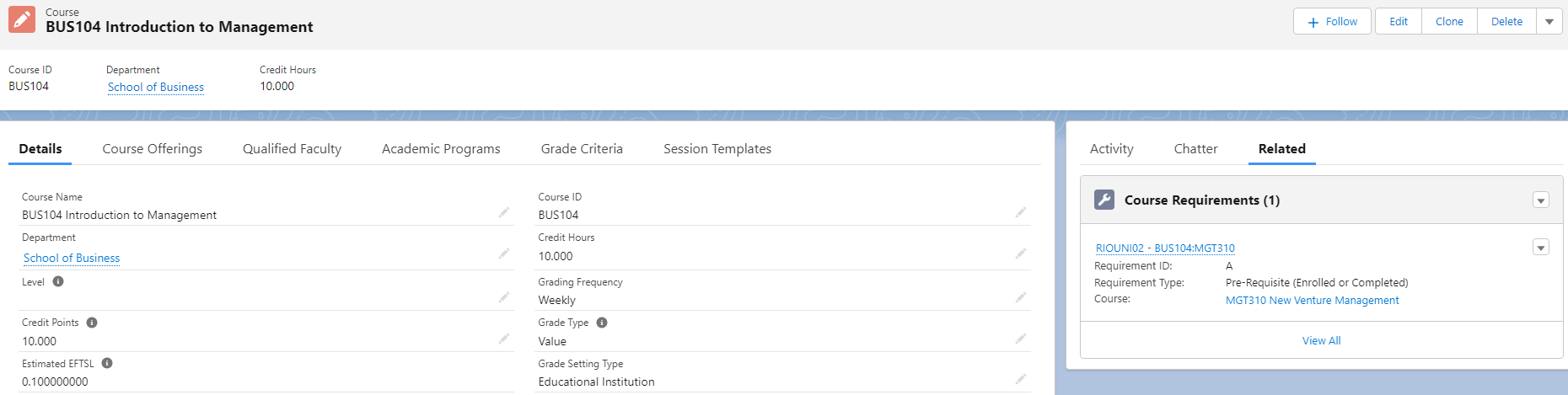
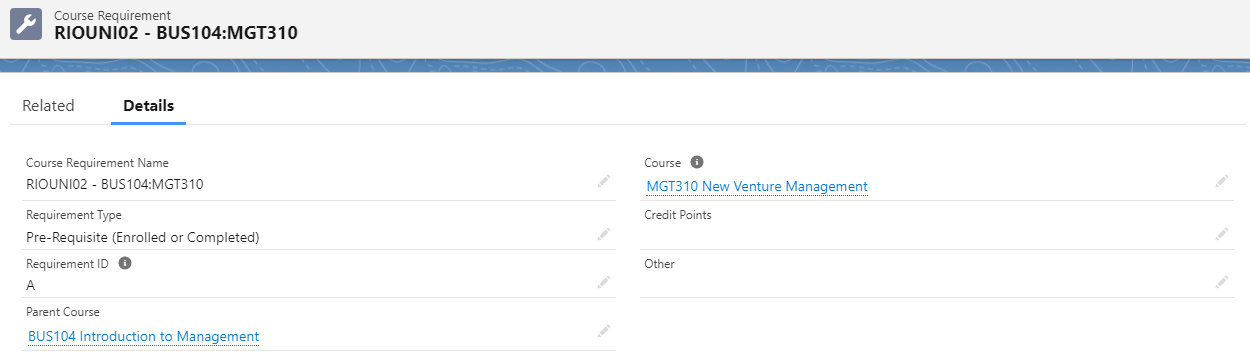
Watch out for the two different Course fields - the “Parent Course” field is the course we want to apply the restriction to, and the “Course” field refers to the requirement. As discussed below, not all requirements are course based, so you may not need to fill this latter Course field out.
The Requirement ID can be whatever you choose. In our examples we often use capital letters, but there's nothing stopping you from using numbers or the Course ID itself. It just has to match the logic you put in the Course's “Requirement Logic” field.
If a Course has Course Requirements, creating a Plan Requirement for the Course will automatically create Program Course Requirements linked to the Plan Requirement, with all the relevant fields copied over for you. It's these Program Course Requirement records that RIO actually considers when determining if a student is eligible or not.
Note that this only happens the first time the Plan Requirement is created. Any subsequent edits to the Course Requirement will not be reflected in the Program Course Requirement. If you create a Plan Requirement before adding the Course Requirement, then you will have to copy it manually.
Whether a course's requirement has been met or not for a particular student is tracked on their corresponding Course Connection record, via the “Requirement Met” box. In the case you wish to override the requirement for a particular student, check the “Allow Pre-Enrollment” box, and RIO will ignore the requirements for that Course Connection. If you try and modify the “Requirement Met” box itself, RIO will discard this change and set it back to its original value.
Requirement Types
There are several different types of requirement you can create, from requiring courses to have been completed or just enrolled into, to ensuring students have first earned a set number of credits.
Pre-Requisite
The first requirement type is “Pre-Requisite”. This mandates that a student must have enrolled into and completed a course before they are able to enroll into this one.
A course is considered to be completed when the following conditions are met on the Course Connection:
- Enrollment Status = Completed
- Grade Result = Pass
For an example on setting prerequisite Courses, head here.
Pre-Requisite (Enrolled or Completed)
Similar to the Pre-Requisite type, “Pre-Requisite (Enrolled or Completed)” allows a student to enroll in a course even if the required course is only enrolled, without being completed.
This is useful for situations where grades may not be released until after the next term's enrollments have opened, and therefore waiting for the grades to release could cause the student to miss out during the enrollment window.
Co-Requisite
The “Co-Requisite” type should be used when two or more Courses should be taken together in the same Term.
Because of the nature of this requirement, the “Requirement Met” box on each relevant Course Connection is always checked. Instead, an information screen will be shown to the student during enrollment that this course has co-requisites they need to also enroll in.

Credit Points
You may have a scenario where a certain course does not depend on another particular course to have been taken first, but the student still should have completed some study load beforehand. Maybe a course should be restricted to only second- or third-year students.
In these cases, you should use the “Credit Points” requirement type.
In our example of restricting a course to only third year-and above students, presuming a full-time study load of 16 credits a year, then you would create a Credit Points type Requirement with the Credit Points field set to 32.
After the student earns their 32nd credit, the requirement will be met and they will become eligible for enrollment into this course.
Other
In case your requirement depends on something else, you can make use of the “Other” type. We don't provide any automation for this type, but there is an “Other” text field we have where you can describe the requirement.
When the requirement is met, you will be able to manually update the “Requirement Met” box on each relevant Course Connection to let the student enroll - RIO won't set it back like it does for the other types.
Requirement Logic
After creating a Requirement on a Course, you need to return to the Course record and populate the “Requirement Logic” field. RIO won't assume that all requirements need to be met before allowing a course enrollment, and you will have to specify your own logic to represent this.
In the simple cases, where there is only one requirement, you just have to fill this field out with the Requirement ID value you chose - in our examples above, this was A.
In the case where you have multiple requirements, you can combine them using the operators AND, OR, or NOT().
A course may have two pre-reqs with IDs A and B. Students must take both, so the Requirement Logic field would read “A AND B”.
You may have two similar courses as pre-reqs, and students only have to take one. In such a case, you should use “A OR B”.
Also on the case where you have two similar courses, you may wish to encode that students can't take both. RIO supports negative requisites using this setup, so on course A you can add a Requirement record for course B, and then set A's Requirement Logic field to “NOT(B)”. This means that if B has been taken, A will no longer be eligible for enrollment.
Important Fields
| Field | Description |
| Course Requirement Name | Enter a name for the Course Requirement being created |
| Requirement Type |
Select the type of requirement from the following:
|
| Requirement ID |
A unique ID to identify each specific Course Requirement (e.g. ‘A’, ‘B’, etc.).
The Requirement Logic field on the corresponding Course should reference the Requirement IDs of its child Course Requirements (e.g. A OR B). |
| Parent Course | The Course under which this Requirement is created |
| Course | The target Course that has to be completed as part of the requirement (e.g. Course ‘MGT310’ is the pre-requisite for this Course) |
| Credit Points | The required amount of credit points for this requirement (if the Requirement Type is ‘Credit Points’) |
| Other | Optional text field for adding description, notes, etc. (if the Requirement Type is 'Other') |